




TL;DR: AI customer service software helps businesses automate support workflows, handle routine inquiries, and assist agents using AI agents, chatbots, and AI copilots. This guide compares the best AI customer service platforms based on AI capabilities, pricing, integrations, scalability, and customer reviews to help teams choose the right solution.
Modern support teams are under pressure to respond faster, manage growing ticket volumes, and meet rising customer expectations, all without adding headcount or overwhelming agents.
Routine inquiries consume valuable time, long wait times reduce satisfaction, and scattered systems make it difficult to deliver consistent, quality customer service standards.
By introducing tools such as chatbots, AI Copilots, and AI agents in customer service, AI customer service software helps teams automate repetitive tasks and streamline support operations.
These tools enable faster resolutions, personalized experiences, and 24/7 support across channels, allowing businesses to operate more efficiently and deliver the responsiveness customers expect.
As organizations look beyond support automation, many are also using these capabilities to strengthen AI for customer engagement across the entire customer journey.
In this blog, we’ll explore leading AI customer service platforms, compare their features and pricing, and show how each solution applies AI to customer support operations.
What is AI customer service software?
AI customer service software is a support solution that uses artificial intelligence to automate support tasks, analyze customer conversations, and assist agents with faster resolutions.
It applies technologies like machine learning and natural language processing to deliver personalized responses and streamline support workflows.
Its core purpose is to help teams reduce response times, improve efficiency, and provide consistent, high‑quality service across all channels.
Why AI customer service tools matter
AI customer service tools are essential parts of how modern teams handle growing customer expectations and increasing support demands.
The following are some of the benefits they offer.
- Speeds up response times: AI tools provide instant answers to common questions, reducing wait times and helping customers get support the moment they need it. This quick access improves satisfaction and prevents frustration caused by delays.
- Reduces repetitive workload: By handling FAQs, basic troubleshooting, order lookups, and other routine tasks, AI frees agents to focus on complex issues that require human judgment. This helps teams work more efficiently without feeling overwhelmed.
- Delivers personalized interactions: AI analyzes past conversations and customer data to tailor recommendations and responses. These personalized moments make support feel more relevant, building stronger customer trust and engagement.
- Ensures 24/7 support availability: Automated systems can assist customers at any time, even outside business hours. This around‑the‑clock help makes your support more reliable and meets the expectations of global audiences.
- Lowers operational costs: AI allows teams to manage higher volumes of inquiries without expanding staffing, reducing support costs. It also shortens onboarding time by guiding agents with automated suggestions and knowledge tools.
- Maintains consistent service quality: AI delivers accurate, on‑brand responses every time, reducing variability between agents. This consistency ensures customers receive dependable support across channels and interactions. Salesforce found that 79% of service leaders believe investing in AI agents is essential to meet current business demands.
- Provides actionable insights: AI analyzes support patterns, identifies recurring issues, and highlights areas for improvement. These insights help teams refine processes, anticipate customer needs, and make smarter decisions.
- Supports multilingual communication: AI translation tools break language barriers by enabling seamless conversations across multiple languages. This improves accessibility and helps businesses serve diverse customer groups more effectively.
For a deeper look at conversational support tools, explore our guide to the best AI chatbots for customer service.
What to look for when choosing an AI-powered customer service software
Before selecting an AI‑powered customer service software, businesses should consider several key factors to ensure the solution truly supports their workflows and delivers a reliable customer experience.
Here are key considerations:
- Feature set: Choose software that offers a well‑rounded mix of essential capabilities, such as automation tools, omnichannel support, and AI‑powered insights, to ensure your team has all the core functions for your business needs.
- Data privacy and security: Ensure the platform protects customer information through encryption, access controls, and compliance with standards like GDPR. Strong security reduces risk, builds trust, and prevents costly breaches.
- Cost vs. benefit: Evaluate the total cost of ownership, including licensing, usage fees, and maintenance, against the measurable gains in speed, productivity, and customer satisfaction.
- Scalability: Select an AI platform that can grow with your organization and handle increasing ticket volumes, channels, and automation needs without performance degradation.
- Customization and flexibility: Every organization has different needs. Select AI solutions that let you modify responses, workflows, and integrations to fit your particular customer service protocols. In fact, McKinsey notes that two-thirds of millennials expect real-time customer service, while three-quarters of customers expect a consistent cross-channel experience, making traditional approaches increasingly difficult to scale.
- Integration with existing tools: Select a platform that connects effortlessly with your help desk, CRM, knowledge base, and communication channels. Strong integrations create a unified support environment and prevent data silos.
If you’re specifically comparing autonomous AI solutions, our roundup of the best AI agents for customer support covers leading options in the category.
Comparison table for the best customer service AI tools
The following table summarizes the top AI help desk solutions available on the market today.
Methodology: We evaluated each AI customer service software based on the factors discussed above, including AI capabilities, security, pricing, scalability, customization, integrations, and overall customer service functionality. We also reviewed official vendor documentation and verified user reviews from G2 and Capterra to assess real-world usability and customer satisfaction. The products below are listed for comparison purposes and are not ranked in a strict order.
| AI customer service software | Key features | Starting price | G2 ratings | Capterra ratings |
| BoldDesk |
|
$99/month for 5 agents | 4.5/5 | 5.0/5 |
| Zoho Desk |
|
Starts at $7/agent/month
|
4.4/5 | 4.5/5 |
| Kustomer |
|
Contact Kustomer for pricing | 4.4/5 | 4.7/5 |
| Intercom |
|
$29/user/month | 4.5/5 | 4.5/5 |
| Tidio |
|
$24.17/month | 4.6/5 | 4.7/5 |
| HubSpot Service Hub |
|
$7/user/month | 4.4/5 | 4.4/5 |
| Freshdesk |
|
$19/user/month | 4.4/5 | 4.5/5 |
| Help Scout |
|
$25/user/month | 4.4/5 | 4.6/5 |
| Zendesk |
|
$19 per user/month | 4.3/5 | 4.4/5 |
| Salesforce Service Cloud |
|
$25/agent/month | 4.4/5 | 4.5/5 |
| Hiver |
|
$25/user/month | 4.6/5 | 4.7/5 |
| HappyFox |
|
$24/user/month | 4.5/5 | 4.6/5 |
Best AI customer support tools for modern support teams
To improve digital customer service operations through automation, personalization, and real-time assistance, the following are some of the top AI customer support products currently on the market:
1. BoldDesk
Best for: Support teams seeking an AI-powered help desk with automated ticketing, omnichannel workflows, multilingual assistance, and predictable pricing.
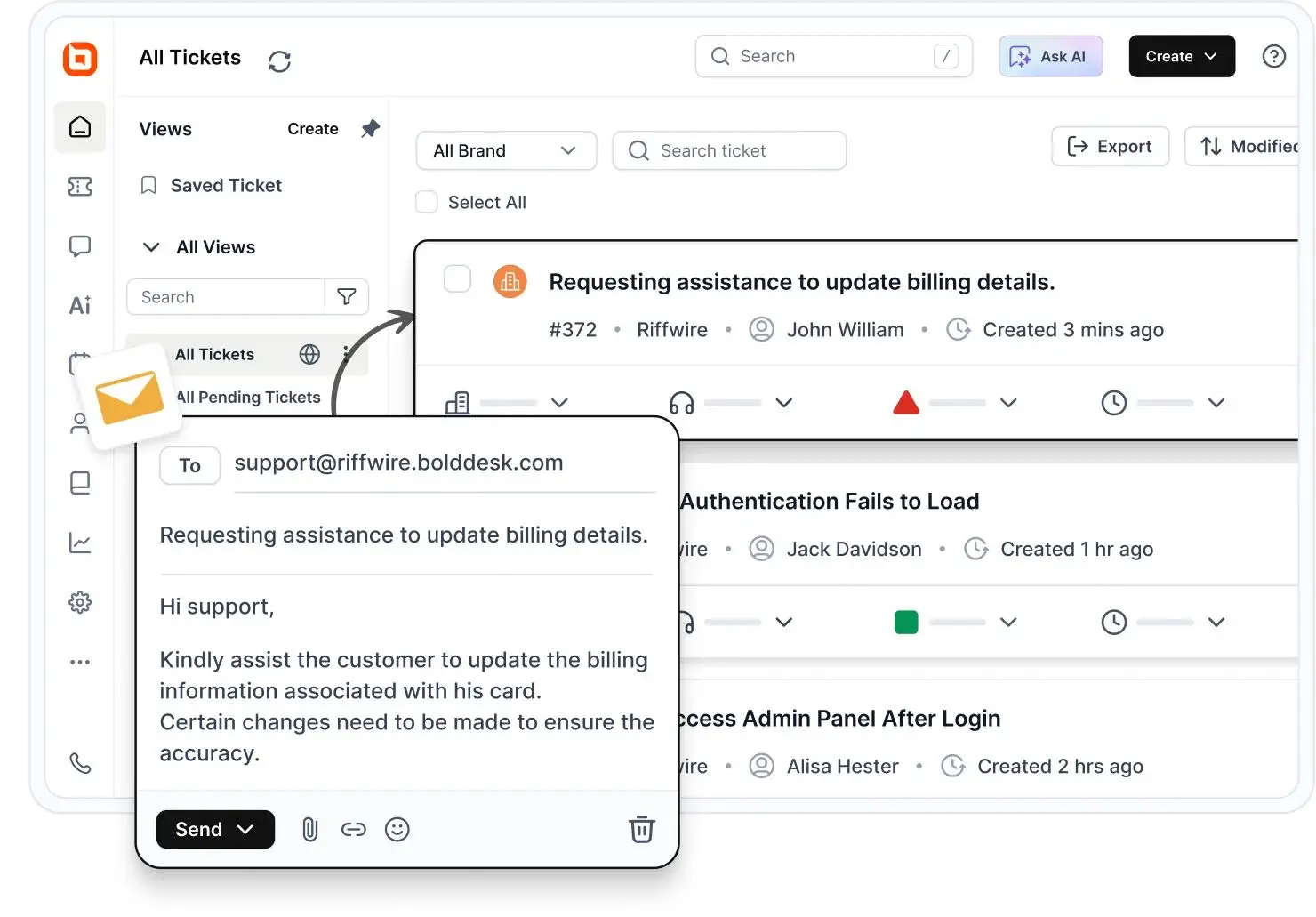
BoldDesk is an AI-powered customer service platform developed by Syncfusion that helps organizations manage support operations from a unified workspace.
Its approach combines AI-driven automation with human-assisted support, enabling teams to streamline customer service workflows while maintaining visibility and control over the support experience.
The platform is particularly well suited to organizations seeking integrated AI capabilities within a help desk environment without adopting separate tools for ticketing, support automation, and agent assistance.
Key features
- AI Agents: Automates customer support by handling routine inquiries, generating context-aware responses, retrieving relevant knowledge, and assisting with ticket resolution across multiple support channels while escalating complex issues to human agents when needed.
- AI ticket automation: Automates ticket assignment, routing, and responses to common questions using AI, helping teams reduce manual workload and speed up resolutions.
- AI Copilot for agents: Assists agents with context‑aware reply suggestions, knowledge recommendations, and real‑time translation to streamline communication.
- Sentiment analysis: Detects customer sentiment within conversations to prioritize issues and improve support quality.
- AI knowledge base: Creates and manages a self‑service knowledge base, with AI assisting in content generation and organization to improve findability.
Pros
- Combines AI agents, AI Copilot, ticketing, automation, knowledge management, and omnichannel support in a single platform.
- Supports customer-facing AI and agent-assist AI, helping teams automate routine requests while keeping human agents involved when needed.
Cons
- Advanced workflow customization can require a learning curve for teams with more complex support requirements.
BoldDesk pricing
Starts at $99/month for 5 agents
Explore the BoldDesk pricing page to see every tier, its features, and available AI add-ons.
Interested in learning more? You can start a free trial and see how BoldDesk’s AI-powered support capabilities align with your team’s customer service needs.
2. Zoho Desk
Best for: Small and mid-sized businesses looking for an AI-powered help desk with ticket automation, self-service, and built-in AI assistance.
Zoho Desk is an AI customer service platform designed to help teams manage support at scale without losing visibility or control over customer interactions.
Its AI capabilities are built directly into the support experience, helping teams streamline routine service operations, improve response quality, and maintain faster resolutions across channels.
Rather than treating AI as a separate layer, Zoho Desk incorporates it into everyday workflows so agents can focus on higher-value customer conversations while support teams deliver more consistent service.
Key features
- Zia AI assistant
- AI agents and answer bot
- AI-assisted response generation
- AI-powered intent detection
Pros
- Combines AI automation with human support workflows.
- Offers both customer-facing AI tools and agent-assist capabilities.
Cons
- Some AI capabilities depend on Zia, and feature availability may vary by plan or configuration.
Pricing
Starts at $7/agent/month
3. Kustomer
Best for: CRM driven organizations that require unified customer timelines, strong workflow automation, and AI support.
Kustomer is an AI-native customer service platform that combines customer data, conversations, and business context in a unified timeline.
Its AI helps teams automate support workflows, recommend next actions, and deliver personalized service across channels.
Key features
- AI agent
- AI-powered automation
- Sentiment analysis
- Unified customer timeline
Pros
- Combines AI with unified customer context to help teams deliver more personalized support.
- Automates routine workflows and provides AI-powered recommendations that help agents resolve issues faster.
Cons
- Additional AI functionality adds to the overall budget requirements.
Pricing
Contact Kustomer for pricing
4. Intercom
Best for: Conversational support teams looking for AI chatbots and deep automation to accelerate responses.
Intercom is an AI-first customer service platform built around Fin AI Agent. The platform combines AI-powered customer support, agent assistance, ticketing, and insights in a single system, helping teams automate routine conversations while keeping agents focused on more complex requests.
Key features
- Fin AI chatbot
- Fin AI copilot
- AI knowledge answers
- AI workflow automation
Pros
- Well‑known for delivering fast, conversational experiences that improve customer engagement.
- Integrates into diverse workflows, making it flexible for different industries.
Cons
- Higher‑tier plans may be too costly for smaller or early‑stage teams.
Pricing
Starts at $29/user/month
5. Tidio
Best for: Ecommerce businesses that want affordable AI chatbots, proactive messaging, and automated workflows.
Tidio is an AI customer service platform that helps businesses automate support conversations using Lyro AI Agent. The platform combines conversational AI, customer support automation, and live chat to help teams resolve routine requests while maintaining human oversight when needed.
Key features
- Lyro AI agent
- AI reply assistant
- AI chatbots
- Automated customer conversations
Pros
- Provides strong value for small businesses and ecommerce brands needing quick deployment.
- Easy to set up and learn, reducing onboarding time for new support teams.
Cons
- AI capabilities require higher‑tier plans, making fully automated support costly.
Pricing
Starts at $24.17/month
6. HubSpot Service Hub
Best for: Businesses that need a CRM connected service platform with ticketing, automation, and customer feedback tools in one unified workspace.
HubSpot Service Hub combines AI-powered customer service, ticket management, and automation within HubSpot’s CRM platform. Its AI tools help teams automate support conversations, resolve tickets faster, and deliver personalized service using shared customer data.
Key features
- AI customer agent
- AI-powered chatbots
- AI-generated responses
- AI-powered knowledge assistance
Pros
- Seamlessly connects service operations with sales and marketing via native CRM alignment.
- Supports easy adoption through user-friendly UX and a wide integration ecosystem.
Cons
- Many essential tools fall behind higher‑priced tiers, impacting affordability.
Pricing
Starts at $7/user/month
7. Freshdesk (Freddy AI)
Best for: Support teams seeking an AI-enhanced help desk with ticketing, omnichannel support, and Freddy AI capabilities.
Freshdesk is an AI customer support platform developed by Freshworks. It is designed for companies looking to improve customer service by combining AI capabilities with traditional support tools. Freddy AI lies at the core of Freshdesk’s AI solution.
Key features
- Freddy AI
- Chatbots
- Self-service solutions
- Smart recommendations
Pros
- Provides reliable performance as teams scale workloads.
- Maintains a user‑friendly interface suitable for fast-moving teams.
Cons
- Some teams report complexity when managing more sophisticated workflows.
Pricing (billed annually)
Starts at $19/user/month
8. Help Scout
Best for: Teams requiring a simple support solution with shared inboxes, live chat, and lightweight AI-powered assistance.
Help Scout is an AI customer service software that combines customer support software with AI-powered assistance that helps teams summarize conversations, draft replies, and deliver instant self-service through AI Answers. The platform is designed to help teams scale support without losing a human-centered experience.
Key features
- Summarization and AI assist
- AI answers
- AI knowledge base
- AI assistants
Pros
- Known for delivering personalized support that benefits customer‑centric brands.
- Easy for small teams to adopt without training overhead.
Cons
- Feels limited for fast‑scaling companies needing deeper automation.
Pricing
Starts at $25/user/month
9. Zendesk
Best for: Enterprises that need omnichannel support, scalable workflows, customizable automation, and powerful AI tools.
Zendesk is an AI-powered customer service platform designed to automate resolutions across the support lifecycle. Its AI agents, Copilot, and knowledge capabilities help teams resolve issues faster while continuously improving service quality through learning from past interactions.
Key features
- Zendesk AI agents
- Zendesk Copilot
- AI-powered knowledge
- AI quality assurance
Pros
- Delivers strong reliability and performance across large teams.
- Enables organizations to manage complex service operations across multiple departments.
Cons
- Some users feel the platform has become cost‑heavy compared to alternatives.
Pricing
Starts at $19/user/month
10. Salesforce Service Cloud (Agentforce Service)
Best for: Enterprise and fast-growing support teams that need AI-powered service, omnichannel support, case management, and CRM-connected customer data on a single platform.
Salesforce Service Cloud is an AI customer service platform built to help organizations deliver support across multiple channels while maintaining efficiency as service demands grow.
Through Agentforce, the platform brings AI into customer service workflows to automate routine interactions, support agents with contextual guidance, and improve resolution efficiency.
Its strength lies in helping large teams scale customer support, maintain service consistency, and provide responsive experiences without increasing operational complexity.
Key features
- Agentforce AI agents
- AI-powered replies
- AI summaries
- AI-powered knowledge recommendations
Pros
- Combines customer service, automation, AI, and CRM data within a unified platform.
- Supports customer interactions across email, chat, phone, SMS, messaging apps, and self-service channels.
Cons
- Pricing for advanced AI capabilities may require contacting Salesforce sales.
Pricing
Starts at $25/agent/month
11. Hiver
Best for: Teams using Gmail that want an inbox-native support platform with AI-powered collaboration features.
Hiver is an AI-powered customer service platform that helps teams manage email, chat, voice, SMS, and other support channels from a unified workspace. Its AI Agents and AI Copilot help automate support tasks, resolve requests, and assist agents with customer conversations.
Key features
- AI Agents
- AI Copilot
- AI Insights
- AI-powered workflow automation
Pros
- Easy to adopt because it works inside Gmail, minimizing training time.
- Promotes transparency and collaboration in teams using shared inbox operations.
Cons
- May feel limiting for teams requiring broad social media support.
Pricing
Starts at $25/user/month
12. HappyFox
Best for: Support, IT, and operations teams that need an AI‑enabled help desk
HappyFox is an AI-powered help desk platform that combines ticket management with Assist AI to automate repetitive support requests, generate responses, summarize conversations, and help teams resolve issues more efficiently.
Key features
- Assist AI
- AI-generated response drafts
- AI ticket summaries
- AI-powered ticket prioritization
Pros
- Suitable for teams needing structured service operations beyond basic customer support.
- Offers strong onboarding and user experience for cross-functional teams.
Cons
- Some users report that the interface becomes complex as customization increases.
Pricing
Starts at $24/user/month
Best practices for implementing AI customer service software
Implementing AI customer service software requires thoughtful planning to ensure it enhances, not disrupts, your existing support operations.
The following tips help teams adopt AI smoothly, maximize its value, and maintain a consistent, customer‑centric experience.
- Start with clear goals: Define what you want AI to achieve, such as reducing response times, lowering ticket volume, improving accuracy, or supporting 24/7 service. Clear outcomes help you configure AI correctly and measure success more effectively.
- Begin with small, high‑impact use cases: Roll out AI in stages by focusing first on predictable inquiries (password resets, order status, simple troubleshooting). Early wins build confidence, reduce risks, and make it easier for teams to adapt before scaling to more complex scenarios.
- Train AI with quality data: Feed your AI models with clean, up‑to‑date knowledge base articles, FAQs, macros, and past resolved tickets. The better the training material, the more accurate and reliable the AI becomes.
- Establish human‑in‑the‑loop controls: Ensure agents can monitor AI responses, intervene when needed, and improve outputs over time. Human review protects accuracy, maintains brand tone, and prevents AI from escalating issues unnecessarily.
- Set clear guardrails and escalation paths: Define which tasks AI should handle, when it should hand off to a human, and how complex or sensitive inquiries are routed. Guardrails maintain service quality, reduce errors, and ensure customers are never left unsupported.
- Integrate with existing systems: Connect the AI tool to your help desk, CRM, knowledge base, and communication channels. This ensures AI has the context it needs and keeps your support environment unified rather than fragmented.
- Train and onboard your team: Educate support agents on how AI works, how to collaborate with it, and how to refine its output. When agents understand AI’s role, adoption increases, and overall efficiency improves.
- Monitor performance and refine continuously: Track AI metrics such as deflection rate, response accuracy, CSAT impact, and escalation patterns. Regular reviews help you fine‑tune workflows, expand automation, and improve the customer experience.
- Prioritize transparency with customers: Let customers know when they are interacting with AI and provide an easy option to connect with a human. Transparency builds trust and reduces frustration, especially for sensitive or urgent issues.
- Maintain compliance and data security: Ensure the AI solution complies with privacy and security regulations, follows data‑handling best practices, and protects sensitive customer information. Safe implementation builds confidence for both customers and internal stakeholders.
Building a solid foundation for AI customer service software
The biggest difference between AI customer service platforms is not the number of AI features they offer but how effectively those features improve everyday support workflows.
The most valuable solutions reduce manual effort, improve resolution efficiency, and help teams manage growing support volumes without adding unnecessary complexity.
As AI capabilities continue to evolve, businesses should prioritize practical outcomes over feature checklists. Comparing platforms based on real support needs, usability, and long-term value will usually lead to a better decision than chasing the latest AI features.
We’d love to hear your thoughts on our AI customer service software comparison! Did we miss any vendors you’d like us to include? Share your feedback in the comments below.
Related articles
- 7 Best Ways to Utilize AI for Customer Experience
- Best Knowledge Management Software for 2026
- 9 Help Desk Management Best Practices for Operations
FAQs
AI customer service solutions typically include a mix of tools that help teams deliver faster, more consistent support across channels.
Common features include:
- A knowledge base allows customers to self-serve and helps AI generate accurate recommendations.
- Live chat enables real-time assistance supported by AI-powered replies or automated chatbots.
- An omnichannel inbox unifies email, chat, social media, voice, and messaging apps into a single workspace so teams can manage all conversations efficiently.
- Workflow automation routes, tags, and categorizes inquiries automatically.
- AI-driven analytics highlights trends, customer sentiment, and performance metrics.
Monitor precision/accuracy of answers, escalation and containment rates, average handle time (AHT), CSAT, and agent feedback.
Retrain with new resolved examples and update your knowledge base as products or policies change.
The best AI customer service software depends on your support needs, automation goals, and budget. Leading platforms such as BoldDesk, Zendesk, Freshdesk, Intercom, and Zoho Desk differ in AI capabilities, scalability, agent assistance, and customer support functionality.
Launching too broadly, weak knowledge sources, unclear escalation rules, and “set and forget” deployments. Avoid over-promising automation; instead, scale coverage only when quality and customer sentiment remain strong.


